Ask your database anything with DaaX SQLer.Get most trustworthy SQL in seconds.
DaaX SQLer turns natural language questions into production-grade SQL. 96% equivalence to expert-written SQL (vs. ~60% using LLM only) on a real customer benchmark of 300 production queries.
And with developer tools that automatically keep SQLer in sync with schema changes, evolving business terminology, etc.
50 queries/month free · No credit card
Most Trustworthy SQL
-- Term Dictionary: "loyal customer" = 2+ orders per quarter,
--                  each of the past 3 quarters
WITH quarterly_buyers AS (
    SELECT customer_id
    FROM orders
    WHERE order_date >= '2025-07-01'      -- past 3 complete quarters
      AND order_date <  '2026-04-01'
    GROUP BY customer_id,
             DATEPART(YEAR, order_date),
             DATEPART(QUARTER, order_date)
    HAVING COUNT(*) >= 2
),
loyal AS (
    SELECT customer_id
    FROM quarterly_buyers
    GROUP BY customer_id
    HAVING COUNT(*) = 3                   -- qualified in all 3 quarters
)
SELECT TOP 5
       c.customer_name,
       SUM(oi.quantity * oi.unit_price) AS mud_spend
FROM customers c
JOIN loyal l        ON l.customer_id = c.customer_id
JOIN orders o       ON o.customer_id = c.customer_id
JOIN order_items oi ON oi.order_id   = o.order_id
JOIN products p     ON p.product_id  = oi.product_id
WHERE p.category    = 'Drilling Fluids'   -- vocab: "mud"
  AND o.order_date >= '2025-04-01'        -- last fiscal year:
  AND o.order_date <  '2026-04-01'        -- Apr 1 2025 – Mar 31 2026
GROUP BY c.customer_name
ORDER BY mud_spend DESC;
Automatic Sync
SQLer example: New column added. SQLer automatically incorporated it into future queries.
customers.customer_name
customers.citycustomers.customer_name
customers.city
customers.customer_tierHow Does DaaX SQLer Work?
Generate your first SQL in minutes
Connect or import your schema
Choose how SQLer discovers your database structure.
Review and focus the schema
Remove irrelevant tables and columns so SQLer focuses on what matters.
Add business context
Teach SQLer your organization's vocabulary, descriptions, and rules.
Test and refine
Ask questions in natural language and review the generated SQL.
Integrate through the API
Add natural language-to-SQL to your application via the SQLer API.
Automatic Sync
Keeps SQLer aligned as your database schema and business terminology evolve.
SQLer System-Level Architectural Diagram
Why LLMs Alone Can Fail At NL2SQL
Same plain-English question. Same database. Different answers — because the LLM has no context for your schema or your company's language.
-- "Show me loyal customers from
-- last quarter"

SELECT customer_name
FROM customers
WHERE loyalty_status = 'loyal'
AND last_order > '2024-10-01';-- Term Dictionary:
-- loyal = 2+ orders per quarter
-- for each of the past 3 quarters
SELECT c.customer_name
FROM customers c
JOIN (
SELECT customer_id,
DATEPART(year, order_date) AS y,
DATEPART(quarter, order_date) AS q
FROM orders
WHERE order_date >= DATEADD(quarter, -3,
DATEFROMPARTS(YEAR(GETDATE()),
((MONTH(GETDATE())-1)/3)*3+1, 1))
GROUP BY customer_id,
DATEPART(year, order_date),
DATEPART(quarter, order_date)
HAVING COUNT(*) >= 2
) q ON q.customer_id = c.customer_id
GROUP BY c.customer_name, q.customer_id
HAVING COUNT(*) = 3;SQLer gives the LLM a helping hand by feeding it missing context so the SQL it returns is what a Developer would have written.
How DaaX SQLer Gives LLMs a Helping Hand
SQLer gives LLMs the schemas, relationships, descriptions, vocabularies, business rules, and examples they need to generate SQL developers can trust. It also keeps this context in sync as databases and business terminology evolve. Developers can manage SQLer through the Developer Dashboard or API.
MS SQL · MySQL · PostgreSQL · SQLite
Single-tenant security
API and Developer Dashboard access
English, Spanish, Japanese, & more
Step 1 — Connect or import your schema
Flexible Setup: Direct Connection, GATHERer, or Manual Upload
SQLer gives developers multiple ways to set up Natural Language to SQL. Use Direct Connection when SQLer can reach your database, GATHERer when your database stays inside your application environment, or Manual Upload when you want to provide SQL DDL files yourself.
GATHERer
GATHERer is a Kubernetes container that runs inside the customer's application environment to gather the setup information SQLer needs, including schemas, tables, columns, relationships, and metadata. With developer permission, GATHERer can automatically transfer the gathered setup information to SQLer, helping teams get started faster without manually copying schema details into an NL2SQL system.
Support for Multiple Databases & Schemas
SQLer supports the way enterprise data is actually organized. Developers can set up SQLer to work with one common database containing multiple schemas, enabling SQL generation across those schemas. For environments where each schema lives in a separate database, SQLer also supports multiple database setups, with developers generating SQL separately for each database from the same SQLer workflow.
▸Show example
One common database for multiple schemas
| Database Type | DB Name | Schema |
|---|---|---|
| My SQL | Common Database | Restaurants Schema |
| Auto Parts Schema |
One database per schema
| Database Type | DB Name | Schema |
|---|---|---|
| MS SQL | Database for Restaurants | Restaurant Schema |
| MS SQL | Database for Auto Parts | Auto Parts Schema |
Please note: in the case of one database per schema, you would have to run two separate queries in SQLer to generate SQL for the two different databases
Step 2 — Review and focus the schema
Exclude Irrelevant Tables & Columns
Not every table or column should be available to AI. SQLer lets developers exclude irrelevant tables, system fields, staging data, audit logs, binary columns, and other schema noise so SQL generation focuses only on the data that matters. The result is cleaner context, fewer wrong turns, and more reliable SQL.
Step 3 — Add business context
Domain Knowledge & Company Language
Your company's vocabulary, formalized. SQLer translates business terms like "loyal customer," "active account," or "churned" into the exact SQL predicates your analysts would write.
Table & Column Descriptions
Column names alone are often not enough for accurate SQL generation. SQLer lets developers use table and column descriptions from schema comments, dbt docs, data catalogs, or manual inputs so generated SQL is grounded in your team's own definitions.
Column & Row Vocabularies
SQLer learns what your columns really mean and which row values matter — so "status = completed" is grounded in the real enum, not a guess. No more hallucinated column names or stale values.
Question-to-SQL Examples
Teach SQLer by example. Add question-and-SQL pairs from your team's real work, and SQLer learns your JOIN patterns, naming conventions, and performance choices — so new questions inherit the style Developers already trust.
Use Case-Specific Instructions
Add extra prompt instructions tailored to your use case — preferred dialect quirks, performance rules, masking requirements, or house style — and SQLer applies them consistently to every query it generates.
Step 4 — Test and refine
Clear Feedback When SQL Can't Be Generated
When a question is ambiguous, under-specified, or outside the configured schema or business context, SQLer can provide feedback instead of blindly generating a confidently wrong query. This helps users clarify the request and helps developers refine schema metadata, vocabularies, descriptions, terms, or examples.
Ongoing after setup
Automatic Sync
Your database keeps changing after your AI application goes live. SQLer gives developers controlled ways to refresh setup information using GATHERer, Direct Connection, or Manual Upload, so new columns, updated relationships, and refreshed metadata can be incorporated into future SQL generation with less manual maintenance.
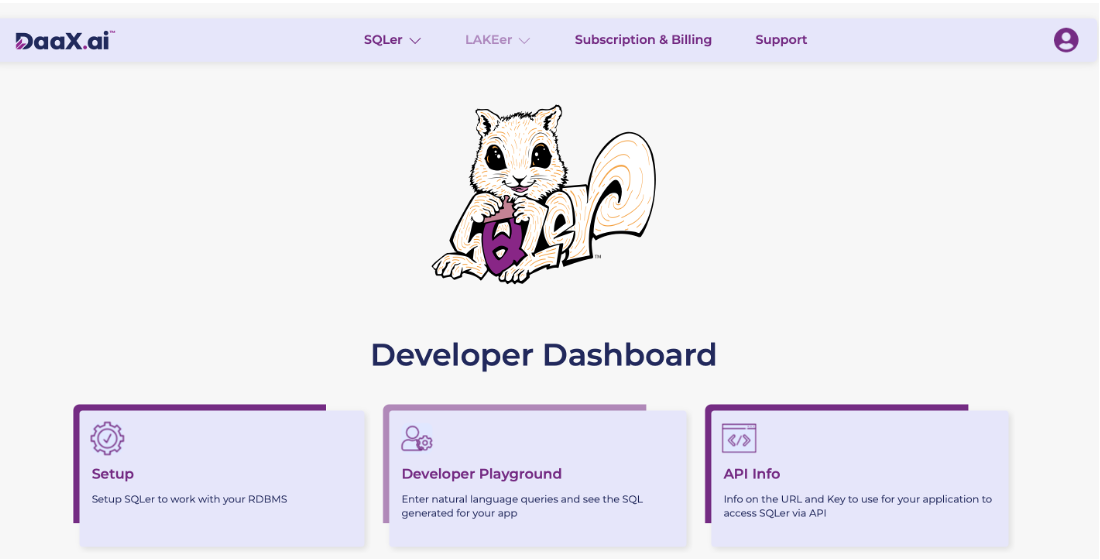
Developer Resources
SQLer Developer Dashboard contains everything you need to integrate it into your applications and workflows
Predictable Outcome-Based Pricing
Choose the plan that fits your needs. Transparent, predictable pricing.

DaaX SQLer Pricing
Production-ready NL2SQL for developers
Free
Start Your Engine
50 queries/month
Still Have Questions?
Schedule a free 15-minute consultation with our engineering team to discuss your specific needs